
For many years now, our marketing team has been experimenting with Facebook ads to promote educational Medicare seminars.
With a lot of tweaking and testing, we've finally landed on somewhat of a formula that brings consistent results every time. I'll share that with you here, along with some insider tips!

Why Facebook Has Become Our Favorite Tool
We've tried advertising the seminars in many ways, but ultimately, Facebook ads are what have worked consistently.
And the reason for that is really simple... baby boomers are on Facebook!
We've been running Facebook ads for monthly seminars for the past three years. Across 29 tracked events, we've generated 245 registrations for a total ad spend of $2,831. That's a median cost of about $10 per signup.
Note on ROI: The reality of educational seminars is they are just that: educational. There is no selling, no sign-up sheet, no sales tactics, and no immediate return on investment. The ROI comes later when that person is ready to sign up for Medicare, rollover their retirement funds, etc. That agent already established credibility with that prospect. It's a natural transition for them to reach out to the agent for help when the time comes.
Some events we get 5 registrations, others we get 20 (which is our maximum per event), but the strategy stays consistent.
Here's exactly how we do it.
Step 1: Set Up the Eventbrite Event
We use Eventbrite to create the actual registration form, then embed it on a landing page on our website.
The landing page includes:
- More details about the seminar (what will be covered and what the retiree has to gain from attending)
- A video of Michael explaining what to expect (put a face to the name!)
- The embedded Eventbrite form (where you can get your free tickets)
The beauty of Eventbrite is that it automatically emails registrants their ticket confirmation and sends a reminder before the event. This dramatically reduces no-shows, and it's less setup work for us.
Note: We experimented with handling the registrations on our own – creating our own emails, workflows, and forms – and it was just too much manual labor to maintain every month. Eventbrite is definitely the way to go, and it's free.
Another thing that works well is offering a text-to-RSVP option in our ads.
Many seniors find it easier to text than to fill out online forms. When someone texts, we fill out the Eventbrite form for them. This simple accommodation significantly increases registrations.
Step 2: Create the Facebook Event
Create your Event from your Facebook business page.
Start about 2 weeks before your seminar date. We've experimented with a month ahead to just a week before, and it seems like two weeks is the sweet spot.
Bonus if you create multiple events – you might promote the date that's in two weeks, but people may also see additional dates in the future and choose to sign up for those.
Your Event description should include:
- The hook and benefit: Every ad needs a good hook – and the best hooks invoke emotion through negative words like don't, stop, or avoid. Example: "Don't let Medicare confusion cost you thousands."
- Social proof: Include 2-3 testimonials from past attendees or clients. Real quotes from real people build trust immediately. Only choose a short snippet from the full testimonial – the part that's most impactful.
- Event details: Date, time, and location.
- How to register: We use Eventbrite embedded on a landing page, but we also tell people they can text the agent directly to RSVP. This is huge – many seniors find texting easier than clicking through forms, and we consistently get signups this way.
- Presenter bio: A brief introduction to establish credibility.
Here's an example of what we write, though we do change up the hook every so often:
"Don't let Medicare confusion cost you thousands. Get your free ticket to this in-person workshop in Decatur, Illinois to learn what every soon-to-be retiree must know!
"Michael does a great job! Made it easy to understand and answered all my questions." –Patty E.
"I attended this last month. It was very informative. I'm so glad I went." –Rita V.
In just one hour, you'll come away relieved that Medicare isn't so confusing after all. Reserve your free tickets on our website or by texting Michael at [cell phone number].
Your Presenter: Michael Sams, award-winning agent, has taught thousands of individuals in the Decatur area about Medicare..."
Step 3: Boost the Event
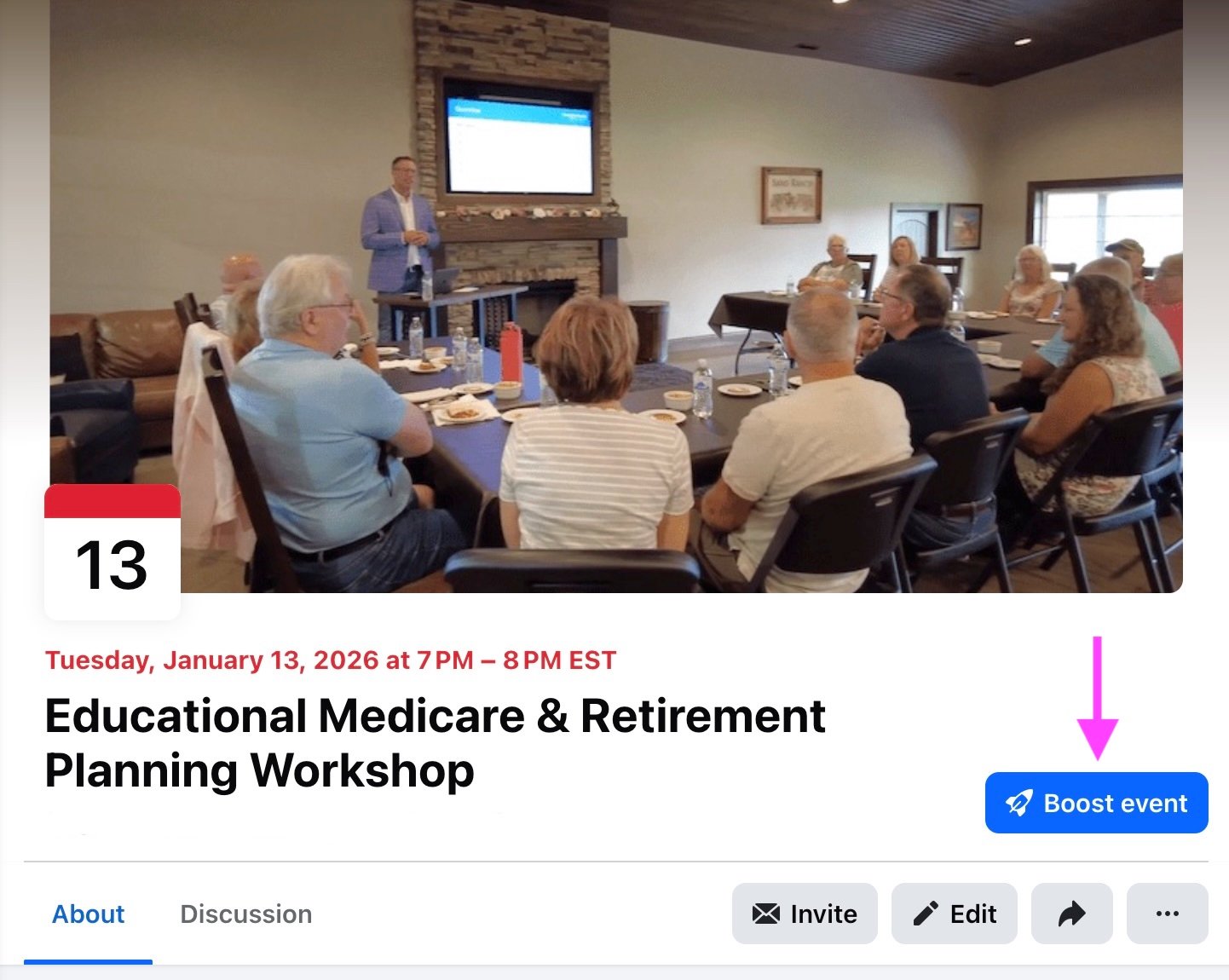
Once the Event is created on Facebook, we "Boost" it. This is different from creating a full Facebook Ads campaign – boosting is simpler and works well for Events.
I promise you – anyone can boost an event. You don't need to be an ads expert or even a Facebook connoisseur – it's not complicated at all.
After you create the Event, just click on "Boost event," which is pointed out in the image below:
Budget: We typically spend a total of $100-$200 per seminar over 2 weeks. We've experimented with as low as $50 to as high as $350, and $100-$200 generally gets us a good number of attendees without breaking the bank.
Audience: Use Advantage+ audience targeting – this has given us the best results compared to manually selecting interests or behaviors. Believe me... we have tried it all!
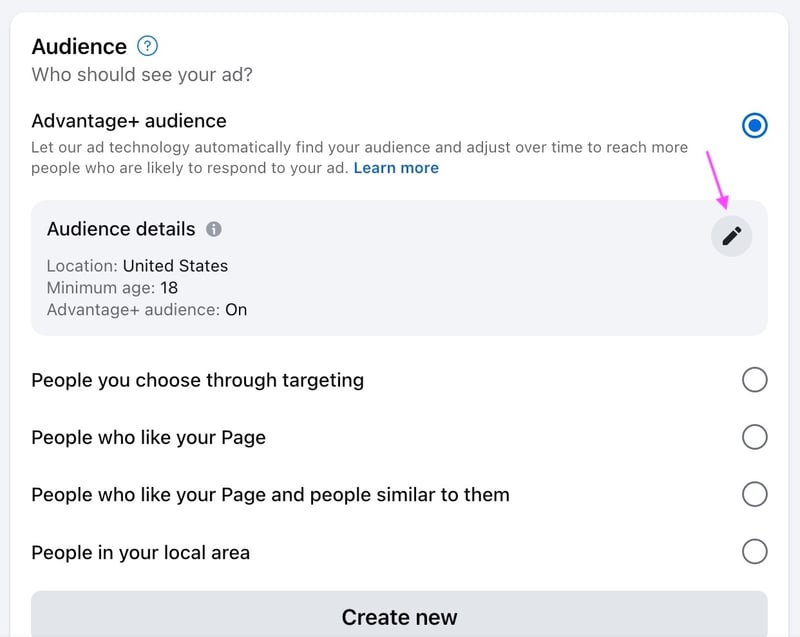
The only settings we adjust are:
- Age: 64-65+ (Note: Meta doesn't allow you to call out age directly in your ad copy, like saying "turning 65 soon?" but you can target by age in the settings)
- Location: 25-30 mile radius around your city or event location
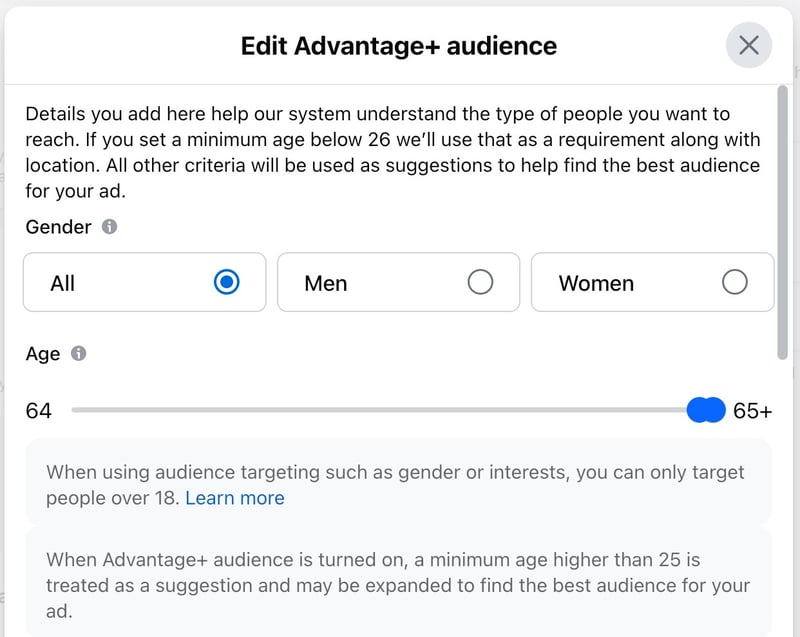
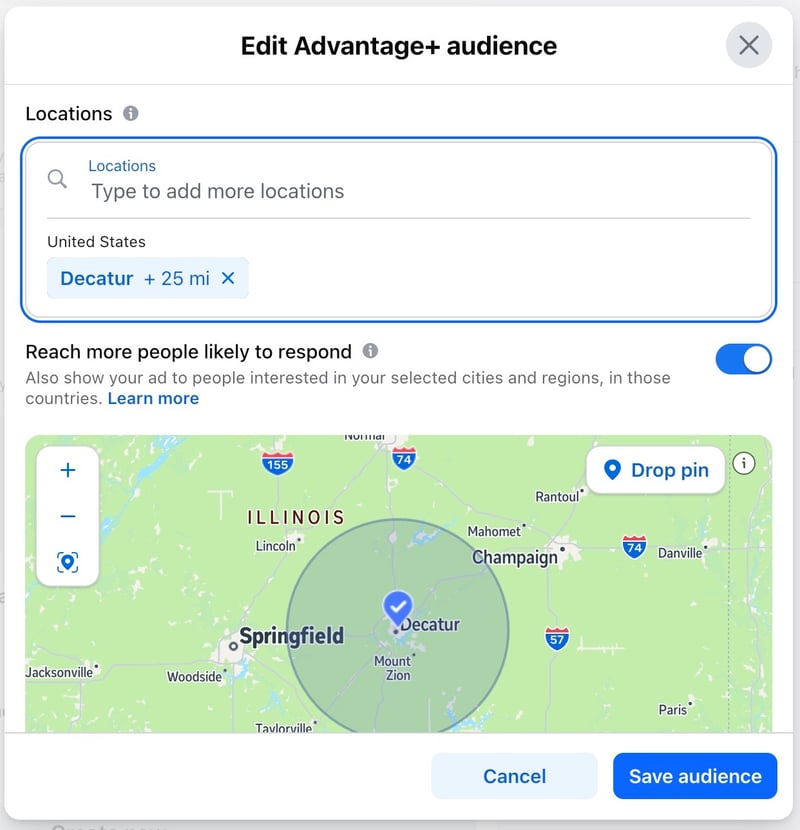
Let Facebook's algorithm do the rest. It will find people most likely to engage with your Event.
The longer you do this, the better Facebook gets at finding the right people.
Your first ad might not perform amazingly well, but you should notice your results getting better (and cheaper) with each new event you boost.
Step 4: Take Your Own Images
Don't use stock photos! I'd put 10 exclamation points here if it didn't look tacky!
The best-performing images are photos from actual seminars – showing seniors in their seats with the agent presenting. These give potential attendees a clear picture of what to expect and make the event feel more real and approachable.
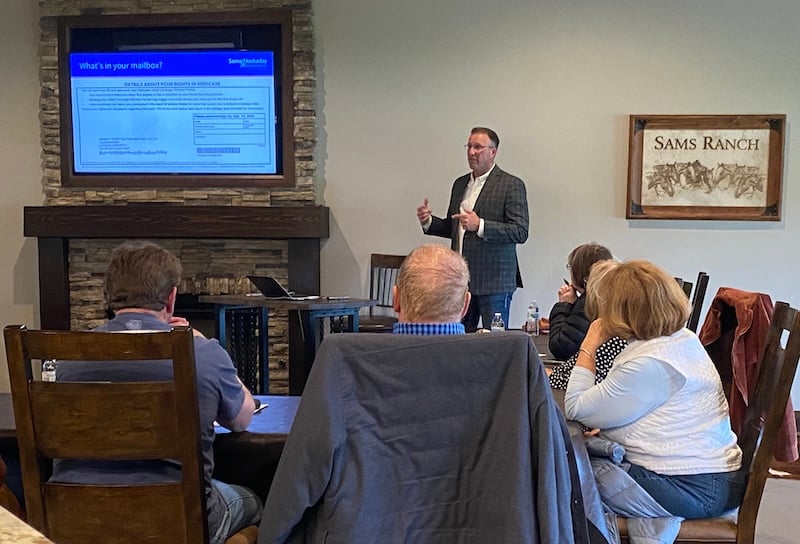
We update our Facebook Event image every couple of months, or it gets stale. I'd actually love to update the image for every new event, but in reality, it's not always easy to coordinate that.
In a perfect world, you'd take new photos at each seminar, so you have fresh content to rotate through.
Video ads could perform even better, and we plan to experiment with those. A short 30-second clip of the agent introducing themselves and explaining what attendees will learn would likely increase registrations even more.
Don't forget to start your video with a hook, just like you do the event description! People give you less than 3 seconds to capture their attention, so if you start with something like, "Hi, my name is..." you've probably already lost the person.
I also recommend starting that hook with negative words like don't, stop, or avoid. Those stop the scroll and get people to pay attention long enough to hear what you're offering.
If you want good hook ideas, I highly recommend watching Brock Johnson and Shannon McKinstrie. I continually get inspiration from them and their social media advice.
What Results to Expect
Results vary significantly based on the time of year, and the data tells a fascinating story.
- November has been our golden month. During the Annual Enrollment Period, we average 9.7 signups per event at just $4.50 per signup. Our best single event ever was November 2024 when we got 20 signups for only $43.35 – that's $2.17 per signup!
- October gets the best attendance with an average of 10 signups per event, but it has cost us significantly more at around $40 per signup. Still, if you want a full room at the beginning of AEP, October delivers.
- Spring is solid. April and May average around 9 signups at $11 per signup. September is also strong with 11 signups averaging at $10.42 per signup.
- Summer is tough. June and August struggle with only 4-6 signups average and cost nearly $30 per signup. If you're planning to take a break from seminars, summer months are a good time to do it.
- We usually skip January and February, so we don't have enough data on those months to share.
The good news: in our experience, almost everyone who registers actually shows up. Unlike many events where 30-50% no-show rates are normal, most seminars have zero no-shows.
This is likely because of Eventbrite's automatic reminders and the personal touch of offering text-to-RSVP. And people want this information – they're confused, and you're going to clear it all up for them!
Also... Be Patient!
The learning curve matters – but so does refreshing your strategy.
Our efficiency improved dramatically from 2023 ($36.18 per signup) to 2024 ($7.65 per signup) as Facebook's algorithm learned our audience. However, 2025 has climbed back up to $18.14 per signup, which tells me it might be time to adjust our approach.
The more you run these campaigns, the better Facebook's algorithm gets at finding your ideal audience – but you also need to keep your creatives (images, videos, and description) fresh. Using the same images and ad copy for too long causes "ad fatigue," where your audience stops engaging.
This is where I believe video ads come in. We've been using static images since we started, and while they work, video ads typically perform better on Facebook.
A 30-second clip of the agent introducing themselves, showing clips from past seminars, or explaining what attendees will learn could significantly improve our cost per signup. It's our next experiment, and we suspect it could bring our 2026 numbers back down to that 2024 efficiency level.
We're all learning as we go.
Staying Compliant
There are two layers of compliance to consider:
Meta/Facebook compliance: You cannot directly call out someone's age in your ad copy. Don't say "turning 65 soon?" or "are you 64?" You CAN target by age in the settings, just not in the copy itself. There are some other little nuances that may come up, but in our experience, the age thing is the one that's the biggest hurdle. If your ad isn't compliant, Facebook will reject it and give you a brief explanation. All you have to do is adjust your ad and re-submit it.
CMS compliance: Your Event must follow educational seminar rules, like:
- Clearly state it's educational, not a sales event
- Don't mention specific plan names or carriers
- Include required disclaimers
For more details on educational event compliance, review this resource:
Getting Testimonials for Future Ads
After each seminar, we like to collect testimonials to use in future Event descriptions. It doesn't happen every time, but when it does, the content we get is gold.
Here are the questions we ask that consistently generate great testimonials:
- What did you learn from coming?
- What did you find most helpful?
- Did you feel pressured at any time during or after the presentation?
- How would you describe the atmosphere and location of the event?
- What would you say to others who are considering coming?
- Would you recommend others to come?
These questions elicit specific, usable quotes that build trust with future attendees. Feel free to put your own spin on them.
We like to ask these questions on camera, which has given us some amazing video testimonials. But if you aren't ready for something like that, a simple email can also work. That way, you at least have text you can add to future event promotions.
The Bottom Line
Facebook ads work for seminar promotion because our audience is already on the platform.
With a modest budget ($100-200 per seminar), clear Event details, and Advantage+ targeting, we have consistently filled educational seminars with qualified prospects at a median cost of $10 per signup.
Focus your efforts on fall months during AEP when efficiency is highest, and don't be discouraged if summer months are slower – that's normal across the board.
If you have any tips of your own, please share them in the comment section below. As Kennedy once said, a rising tide lifts all boats.
Further reading: 15 Tips for Hosting an Educational Medicare Seminar

Comments